13 Web Development Best Practices [2026]
Web application development best practices are well-established methods that help improve the performance, security, usability, and long-term reliability of web applications.
As technology continues to evolve, following recognised web development standards remains important. These practices help deliver consistent results, reduce the risk of errors, and make websites and applications easier to manage over time.
To help guide your next project, we have outlined ten important web development best practices that support successful website and web application development.
The following techniques are commonly used by experienced web development companies to create reliable, effective, and user-friendly websites.
Why Is It Necessary To Respect The Good Practices Of Web Development?
Software and applications are usually created to solve a specific business need. A well-planned project should support your business goals and help you achieve the results you want online. Using custom-built solutions and modern technology can help create a system that suits your needs.
At 10am Digital, our experience helps businesses address important areas of web development, including:
- Cybersecurity: Following good security practices helps protect your data and reduces the risk of cyber attacks.
- Custom Solutions: We create tailored, high-performing software designed to support your business goals.
- Energy Efficiency: Smart, efficient design can reduce the resources needed to run your software and help lower operating costs.
- Cost Control: Careful planning helps define technical requirements early, making it easier to manage the project budget and avoid unexpected costs.
General Good Practices
Web development best practices are trusted guidelines used to create websites and web applications that are fast, secure, reliable, and easy to use. They also support web performance optimization and help businesses follow recognised standards for web development.
A successful project starts by clearly defining your target audience and defining business goals early. This helps ensure the website is designed to meet user needs while supporting business objectives.
These are good practices that help make sure a website works properly on different devices and browsers, performs well for users, and can handle future growth without major changes.
Put simply, best practices help turn a basic website into a professional solution that is ready for everyday use.
These guidelines are designed to help avoid common problems, reduce mistakes, and improve the overall quality of a project.
Most web development best practices fall into a few important areas.
1. Make It Fit Every Screen:
Responsive web design helps websites look and work well on different screen sizes, including computers, tablets, and mobile phones. It automatically adjusts the layout, images, and content to fit the user’s screen.
Benefits:
- Provides a better experience for people using different devices.
- Can increase enquiries, sales, and other conversions.
- Helps reduce the number of visitors who leave the website quickly.
- Only one version of the website needs to be maintained, which can save time and money.
Common Tools:
- Bootstrap: A popular framework that helps developers create responsive websites more quickly.
- Foundation: A framework that includes tools and features for responsive design.
- CSS Grid Layout: A built-in web development feature used to create flexible page layouts that adapt to different screen sizes.
- Media Break Points: Media breakpoints are settings used in responsive web design to adjust how a website looks on different screen sizes. They allow developers to change layouts, font sizes, navigation menus, and other design elements so a website works well on desktop computers, tablets, and mobile phones.

2. Mobile Optimization
Mobile optimisation focuses on making websites fast, easy to use, and reliable on mobile phones and tablets. This can include loading content only when it is needed, improving page speed, and adjusting website settings so pages display correctly on smaller screens.
Benefits:
- Encourages mobile users to stay on the website for longer.
- Can help improve search engine rankings because search engines prioritise mobile-friendly websites.
- Creates a better experience for visitors and helps build trust in your business.
Common Tools:
- AMP (Accelerated Mobile Pages): A framework designed to help mobile pages load more quickly.
- LazyLoad: A tool that delays loading images and videos until they are needed, helping pages load faster.
- Viewport Meta Tag: A website setting that helps pages display correctly on different mobile screen sizes.
3. Speed Up Web Performance
Performance optimisation is the process of making a website load faster and run more smoothly. This can include reducing file sizes, storing frequently used information, and using systems that deliver website content more efficiently to visitors.
Benefits:
- Faster websites provide a better experience for visitors.
- Can reduce the number of people who leave the website before it finishes loading.
- May improve search engine rankings, as website speed is an important ranking factor.
- Can reduce the amount of work required from the server and lower data usage.
Common Tools:
- Webpack and Vite: Tools that help optimise website files and improve performance.
- PageSpeed Insights: A Google tool that checks website speed and provides suggestions for improvement.
- Cloudflare: A service that helps websites load faster and provides additional security protection.
4. SEO / GEO (AI) Friendly Practices:
SEO and AI optimisation are practices that help search engines and AI tools understand your website and find its content more easily. This includes using clear page titles, headings, website addresses, and useful content that answers the questions people are searching for.
Benefits:
- Can increase the number of visitors coming from search engines and AI tools.
- Helps more people discover your business online.
- Supports long-term growth in website traffic.
Common Tools:
- Yoast SEO: A WordPress plugin that helps improve on-page SEO.
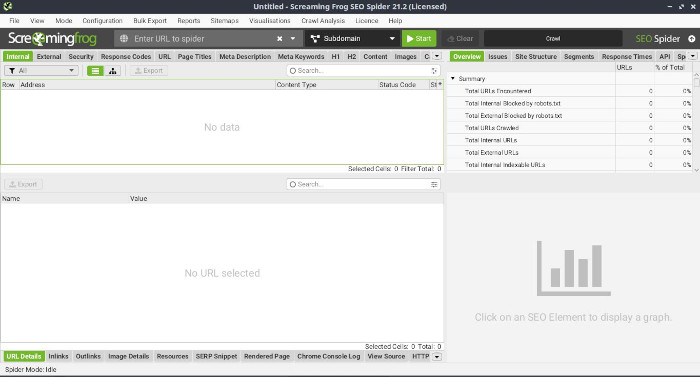
- Screaming Frog: A tool that checks websites for SEO issues and improvement opportunities.
- Google Keyword Planner: A tool that helps find popular search terms and content ideas.
5. Welcome Everyone With Accessibility
Accessibility means making sure a website can be used by as many people as possible, including people with vision, hearing, physical, or learning difficulties. This can include using clear website structure, making content easy to navigate, and providing alternatives for images and other media.
Benefits:
- Helps more people access and use your website.
- Supports compliance with accessibility standards and requirements.
- Improves the overall user experience for all visitors.
Common Tools:
- Axe: A tool that helps identify and fix accessibility issues on websites.
- ARIA (Accessible Rich Internet Applications): Features that help assistive technologies understand website content more clearly.
- WAVE: A tool that checks websites for accessibility issues and measures compliance with accessibility guidelines.
6. Test On Different Browsers
Cross-browser compatibility means making sure a website works correctly on different web browsers and devices. Because browsers can display websites in slightly different ways, developers test websites carefully to make sure everything looks and works as expected.
Benefits:
- Provides a consistent experience for users across different browsers and devices.
- Reduces the chance of layout problems or broken features.
- Helps build trust by ensuring the website works reliably for all visitors.
Common Tools:
- BrowserStack: A tool used to test websites on different browsers and devices.
- Autoprefixer: A tool that automatically adds browser-specific code where needed.
- Modernizr: A tool that checks which website features are supported by a user’s browser and helps improve compatibility.
7. Keep It Safe And Secure
Cybersecurity involves protecting a website from online threats, such as hackers, malware, and data theft. This includes using secure connections, protecting user information, keeping software up to date, and following good security practices to reduce risks.
Benefits:
- Helps protect sensitive information and user privacy.
- Reduces the risk of unauthorised access, data breaches, and website damage.
- Builds trust and confidence with website visitors.
Common Tools:
- Let’s Encrypt: A free service that provides security certificates to help protect website data.
- OWASP (Open Web Application Security Project): A trusted source of web security advice, tools, and best practices.
- Security Headers: A tool that helps improve website security by checking important security settings.
- Cloudflare: A service that provides free website security features, including HTTPS protection and defence against online attacks.
8. Performance Optimization And Monitoring
Performance monitoring and optimisation involves regularly checking how well a website is performing and making improvements where needed. By tracking important performance measurements, developers can identify issues, improve loading speeds, and create a better experience for visitors.
Benefits:
- Helps identify and fix performance problems before they affect users.
- Improves visitor satisfaction and encourages people to stay on the website longer.
- Can improve search engine rankings and online visibility.
Common Tools:
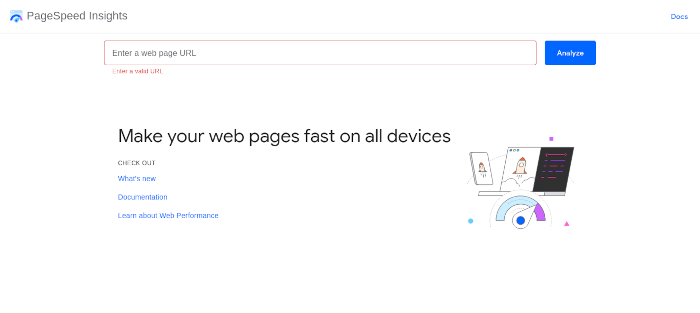
- Google PageSpeed Insights: A tool that measures website speed and provides suggestions for improvement.
- New Relic: A tool that monitors website and application performance to help identify issues.
- Lighthouse: An automated tool that checks website quality, including performance, accessibility, and overall user experience.
9. Regular Testing And Quality Assurance
Regular testing and quality assurance help make sure a website works correctly, performs well, and provides a good experience for users. This includes checking website features, testing updates, gathering user feedback, and fixing problems before they affect visitors.
Benefits:
- Helps find and fix issues early.
- Creates a more consistent experience across different devices and browsers.
- Ensures website features work as expected and meet user needs.
Common Tools:
- Selenium: A tool that automates website testing to help identify problems.
- Cypress: A testing tool used to check that website features work correctly from start to finish.
- UserTesting: A platform that collects feedback from real users to help improve website usability.
10. Focus On User Experience For Higher Engagement
Website development best practices focus on creating a positive user experience (UX). When a website is easy to use and understand, visitors are more likely to stay longer and return in the future.
One important part of this is clear navigation. Visitors should be able to find the information they need quickly and without confusion. Well-organised menus, clear categories, and a search feature can make a website much easier to use and improve the overall user experience.
Web Best Practices For Developers
We have already discussed some of the technologies used to build websites. Now let’s look at the best practices developers use to make sure websites are accessible and usable for as many people as possible.
One of the challenges of web development is that you do not know what device, browser, or technology a visitor will use to view your website. For example, someone might visit your website on a mobile phone, a laptop, a tablet, or an older computer. Others may use assistive technology, such as a screen reader, to help them access website content.
Because every visitor may have a different setup, websites should be designed to be flexible and work well in a wide range of situations. While not every user will have exactly the same experience, the goal is to ensure that everyone can access and use the website successfully.
The following concepts are considered important web development best practices. They help improve usability, accessibility, performance, and compatibility, making websites more effective for a wider audience.
1. Progressive Enhancement
Progressive enhancement is the practice of making sure a website’s most important features work for everyone, regardless of their device, browser, or internet connection. Once the basics are working, extra features and improvements can be added for users whose devices can support them.
While modern browsers and faster internet connections have made this less of a concern than in the past, it is still important. For example, a simpler version of a website may load faster on mobile devices, use less data, and work better for people with slower or limited internet connections.
By focusing on the essentials first, developers can make websites more accessible, reliable, and user-friendly for a wider range of visitors.

2. Separating The Layers
A common web development practice is to keep a website’s content, design, and functionality in separate files. For example, HTML is used for content, CSS is used for appearance, and JavaScript is used for interactive features.
Keeping these parts separate makes the code easier to read, update, and manage. It also helps team members work on different parts of a project without interfering with each other’s work.
In practice, some overlap is sometimes necessary, but separating content, design, and functionality is generally considered a good approach whenever possible.
3. Internationalization
Internationalisation is the process of making a site easy to use for people from different countries, cultures, and language backgrounds.
This may involve supporting multiple languages and making sure the website layout works correctly for languages that are read differently, such as from right to left. It is also important to use clear and simple language so that more people can easily understand the content.
By considering different languages and cultures, websites can provide a better experience for a wider range of users around the world.
Tools
After learning the main technologies used to build websites, such as HTML, CSS, and JavaScript, you will discover many tools that can make web development easier and more efficient.
Some of these tools include:
- Developer Tools: Built into modern web browsers, these tools help developers find and fix problems in their code.
- Testing Tools: These tools check whether a website is working correctly and help identify issues before users find them.
- Frameworks and Libraries: These are collections of pre-built code that help developers create websites and web applications more quickly.
- Linters and Formatters: These tools help keep code organised and consistent by checking it against coding standards and automatically correcting formatting where needed. For example, Prettier is a popular formatting tool used by many developers.
CSS Reset vs CSS Normalize
CSS Reset and CSS Normalize are two methods used to make websites and web apps look more consistent across different browsers and platforms. They help developers create a more reliable experience when working with modern web technologies.
A CSS Reset removes most of the browser’s default styling, giving developers a blank starting point for their website or application. A CSS Normalize approach keeps useful default styles but adjusts them so they appear more consistent across different browsers. This helps maintain a stable foundation for a website’s design and overall architecture.
Today, CSS Normalize is generally preferred because it preserves helpful browser features while still improving consistency. As a result, the traditional Reset CSS approach is often considered outdated and is used less frequently in modern web development.
While tools like CSS Normalize help with appearance and compatibility, developers should also follow other best practices, such as using semantic HTML, to improve website structure, accessibility, and maintainability across a site or web application.
Overview Of Modern Web Technologies
There are several technologies you can learn if you want to become a front-end web developer. The three most important are HTML, CSS, and JavaScript.
HTML (HyperText Markup Language) is used to create the structure and content of a website. It tells the browser what information should appear on the page, such as headings, text, images, and links. You can think of HTML as the framework of a house, including the walls and foundations that hold everything together.
CSS (Cascading Style Sheets) is used to control how a website looks. It can change colours, fonts, spacing, layouts, and animations. If HTML is the structure of a house, CSS is the paint, decorations, and furniture that make it look attractive.
JavaScript is used to make websites interactive. It allows websites to respond to user actions, update content without reloading the page, and provide advanced features. In the house example, JavaScript is like the appliances and electronics that make the house useful and functional.
You may also hear the term API (Application Programming Interface). An API allows JavaScript to interact with other software, services, or device features, such as a camera, microphone, or online data source. APIs help developers add extra functionality to websites without building everything from scratch.
Together, HTML, CSS, and JavaScript form the foundation of modern website development.
Never Stop Learning
Web development is constantly changing as new technologies, tools, and ideas are introduced. To keep your skills up to date, it is important to continue learning.
Reading articles, joining online communities, attending events, and exploring new tools can help you stay informed and improve your knowledge. The more you learn and practise, the better you will become at building effective and professional websites.
Conclusion
Building a successful website involves more than just creating an attractive design. It also requires good development practices, a positive user experience, strong SEO, and reliable security.
Whether your website is built by your own team or by a website development company such as 10am Digital, following these principles can help support long-term success.
At 10am Digital, we combine planning, proven development methods, and ongoing improvements to create high-performing websites that help businesses achieve their goals.